Note
Go to the end to download the full example code.
MagmaForge: Equilibrium Crystallization#
Demonstrates how to run an equilibrium crystallization routine using MagmaForge.
Open this code in an executable MyBinder instance (MyBinder links may be slow to load– please be patient!):

Initialization#
Import necessary packages:
import thermoengine
from thermoengine import magmaforge

import numpy as np
import pandas as pd
import matplotlib.pyplot as plt
Define a bulk composition:
morb_oxides = pd.Series({
            'SiO2':  48.68,
            'TiO2':   1.01,
            'Al2O3': 17.64,
            'Fe2O3':  0.89,
            'Cr2O3':  0.0425,
            'FeO':    7.59,
            'MgO':    9.10,
            'CaO':   12.45,
            'Na2O':   2.65,
            'K2O':    0.03,
            'P2O5':   0.08,
            'H2O':    0.2},)
System and Calculations#
Define system using magmaforge:
sys = magmaforge.System(comp=morb_oxides,
                        T_C = 1350,
                        P_bar=1000.0,
                        logfO2 = ('QFM', -1),
                        database='MELTS_v1_0',
                        )
/workspaces/ThermoEngineLite/thermoengine/thermoengine/magmaforge/system.py:251: UserWarning: Warning: Setting an fO2 value will redistribute the FeO and Fe2O3 values given.
  warnings.warn('Warning: Setting an fO2 value will redistribute the FeO and Fe2O3 values given.')
Crystallize system:
sys.crystallize(method='equil',
                T_step=5,
                fix_fO2=True,
                )
<thermoengine.magmaforge.system.System object at 0xffff90773430>
Output#
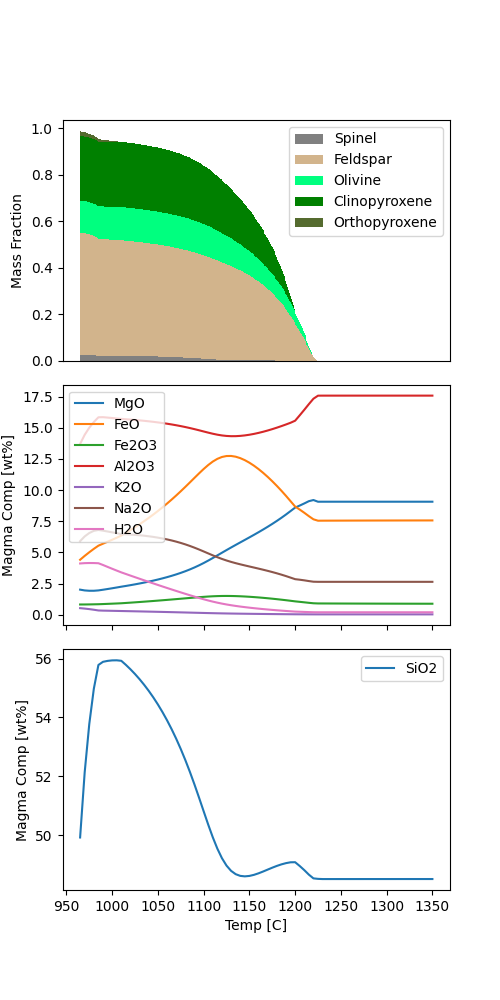
Magma Evolution plot
magmaforge.plot.magma_evolution(sys.history)

If you want to specify the color for each phase, you can assign them via a dictionary:
phase_colors = {'Spinel': 'gray',
                'Feldspar': 'tan',
                'Olivine': 'springgreen',
                'Clinopyroxene' : 'green',
                'Orthopyroxene': 'darkolivegreen'}

magmaforge.plot.magma_evolution(sys.history, phase_colors=phase_colors)
Return useful output variables#
The following commands demonstrate examples of how to return properties for all states in system’s history. Other properties can be accessed as well– see https://thermoenginelite.readthedocs.io/en/latest/api/magmaforge_system.html for more information.
T = sys.history.get_temperatures(unit='C')
P = sys.history.get_pressures(unit='bar')
logfO2 = sys.history.get_logfO2s(buffer='QFM')
liq_comp = sys.history.get_phase_comps(phase_name='Liquid', unit='wt_oxides')
phase_frac_table = sys.history.get_phase_frac_table(phases='present')

print(T) # replace with whichever variable you would like to access
[1350. 1345. 1340. 1335. 1330. 1325. 1320. 1315. 1310. 1305. 1300. 1295.
 1290. 1285. 1280. 1275. 1270. 1265. 1260. 1255. 1250. 1245. 1240. 1235.
 1230. 1225. 1220. 1215. 1210. 1205. 1200. 1195. 1190. 1185. 1180. 1175.
 1170. 1165. 1160. 1155. 1150. 1145. 1140. 1135. 1130. 1125. 1120. 1115.
 1110. 1105. 1100. 1095. 1090. 1085. 1080. 1075. 1070. 1065. 1060. 1055.
 1050. 1045. 1040. 1035. 1030. 1025. 1020. 1015. 1010. 1005. 1000.  995.
  990.  985.  980.  975.  970.  965.  960.]
If you wish to save the full state history, you can do so with the .save_full_state_history_table() method. Soon, you will be able to reload this table into MagmaForge to access its properties.
sys.history.save_full_state_history_table(filename='magmaforge_output.csv', P_unit='bar', T_unit='K', fO2_buffer='QFM')
Total running time of the script: (0 minutes 23.524 seconds)