Note
Go to the end to download the full example code.
MagmaForge: Fractional Crystallization#
Demonstrates how to run an equilibrium crystallization routine using MagmaForge.
Open this code in an executable MyBinder instance (MyBinder links may be slow to load– please be patient!):

Initialization#
Import necessary packages:
from thermoengine import magmaforge

import numpy as np
import pandas as pd
import matplotlib.pyplot as plt
Define a bulk composition:
morb_oxides = pd.Series({
            'SiO2':  48.68,
            'TiO2':   1.01,
            'Al2O3': 17.64,
            'Fe2O3':  0.89,
            'Cr2O3':  0.0425,
            'FeO':    7.59,
            'MgO':    9.10,
            'CaO':   12.45,
            'Na2O':   2.65,
            'K2O':    0.03,
            'P2O5':   0.08,
            'H2O':    0.2},)
System and Calculations#
Define system using magmaforge:
sys = magmaforge.System(comp=morb_oxides,
                        T_liquidus=True,
                        P_bar=1000.0,
                        logfO2 = ('QFM', -1),
                        database='MELTS_v1_0',
                        )
/workspaces/ThermoEngineLite/thermoengine/thermoengine/magmaforge/system.py:259: UserWarning: Warning: Setting an fO2 value will redistribute the FeO and Fe2O3 values given.
  warnings.warn('Warning: Setting an fO2 value will redistribute the FeO and Fe2O3 values given.')
Crystallize system:
sys.crystallize(method='frac',
                T_step=4,
                fix_fO2=True,
                T_final_C = 1000
                )
<thermoengine.magmaforge.system.System object at 0xffff8347c710>
Output#
Phase mass table (with solid masses reported prior to fractionation)
tbl = sys.history.get_phase_mass_table(phases='present', prior_to_fractionation=True)

tbl
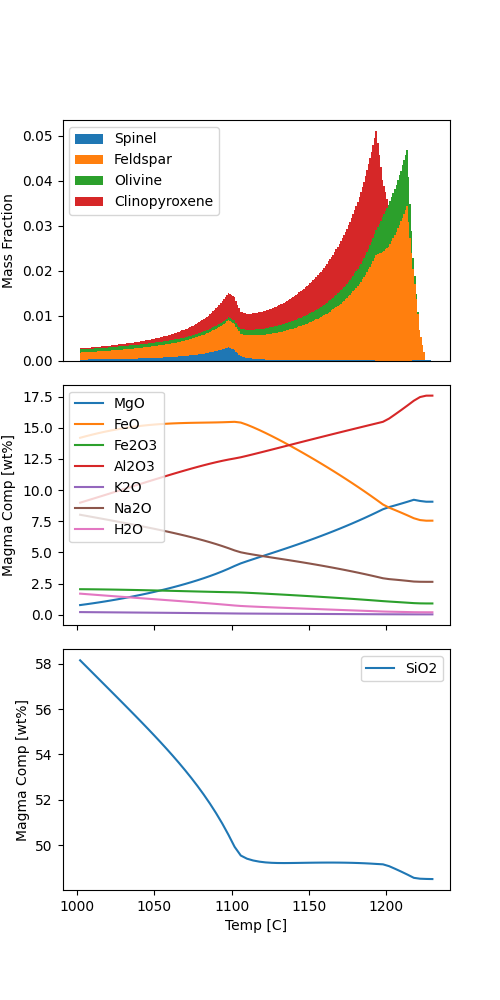
Magma Evolution plot
magmaforge.plot.magma_evolution(sys.history, prior_to_fractionation=True)
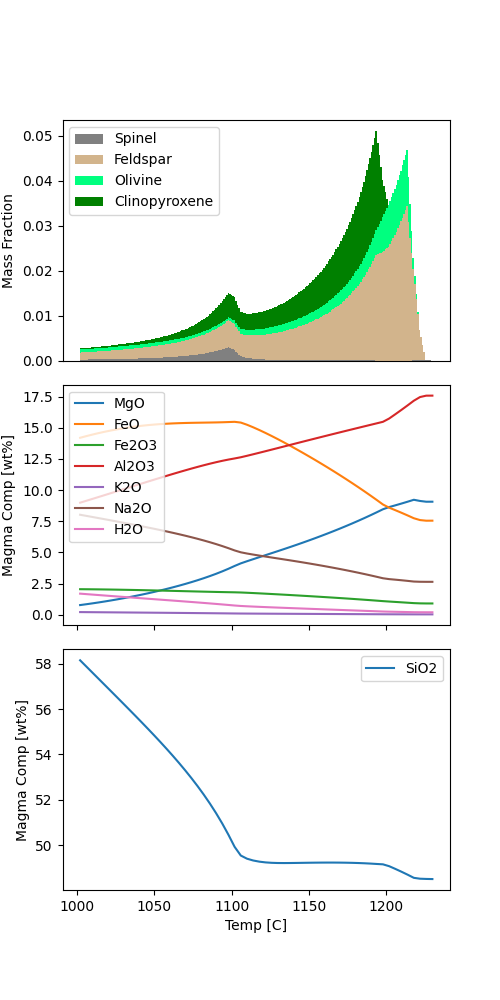
If you want to specify the color for each phase, you can assign them via a dictionary:
phase_colors = {'Spinel': 'gray',
                'Feldspar': 'tan',
                'Olivine': 'springgreen',
                'Clinopyroxene' : 'green',
                'Orthopyroxene': 'darkolivegreen'}

magmaforge.plot.magma_evolution(sys.history, phase_colors=phase_colors, prior_to_fractionation=True)
Return useful output variables#
The following commands demonstrate examples of how to return properties for all states in system’s history. Other properties can be accessed as well– see https://thermoenginelite.readthedocs.io/en/latest/api/magmaforge_system.html for more information.
T = sys.history.get_temperatures(unit='C')
P = sys.history.get_pressures(unit='bar')
logfO2 = sys.history.get_logfO2s(buffer='QFM')
liq_comp = sys.history.get_phase_comps(phase_name='Liquid', unit='wt_oxides')
phase_frac_table = sys.history.get_phase_frac_table(phases='present')

print(T) # replace with whichever variable you would like to access
[1229.93637935 1225.93637935 1221.93637935 1217.93637935 1213.93637935
 1209.93637935 1205.93637935 1201.93637935 1197.93637935 1193.93637935
 1189.93637935 1185.93637935 1181.93637935 1177.93637935 1173.93637935
 1169.93637935 1165.93637935 1161.93637935 1157.93637935 1153.93637935
 1149.93637935 1145.93637935 1141.93637935 1137.93637935 1133.93637935
 1129.93637935 1125.93637935 1121.93637935 1117.93637935 1113.93637935
 1109.93637935 1105.93637935 1101.93637935 1097.93637935 1093.93637935
 1089.93637935 1085.93637935 1081.93637935 1077.93637935 1073.93637935
 1069.93637935 1065.93637935 1061.93637935 1057.93637935 1053.93637935
 1049.93637935 1045.93637935 1041.93637935 1037.93637935 1033.93637935
 1029.93637935 1025.93637935 1021.93637935 1017.93637935 1013.93637935
 1009.93637935 1005.93637935 1001.93637935  997.93637935]
If you wish to save the full state history, you can do so with the .save_full_state_history_table() method. Soon, you will be able to reload this table into MagmaForge to access its properties.
sys.history.save_full_state_history_table(filename='magmaforge_output.csv', P_unit='bar', T_unit='K', fO2_buffer='QFM')
Total running time of the script: (0 minutes 21.875 seconds)